
We’ve sold WordPress themes for years, and for years a good part of our support mail came from people who never bought anything. Some had a copy from a nulled site. Some bought a different theme from someone else. Each one took a reply, a check of the purchase code, and another reply. Our buyers waited while we did it.
We wanted a contact form that does that check for us. Contact Form 7 can’t, the big builders lock conditions, entries and payments behind a yearly plan, and none of them knows what a purchase code is. So we built our own.
Today Re:Maily 1.0 is on wordpress.org. The form builder is free, with nothing locked and no Pro version. Small add-ons take care of the rest, including the one we built it for: support only for your buyers.
What you get for free
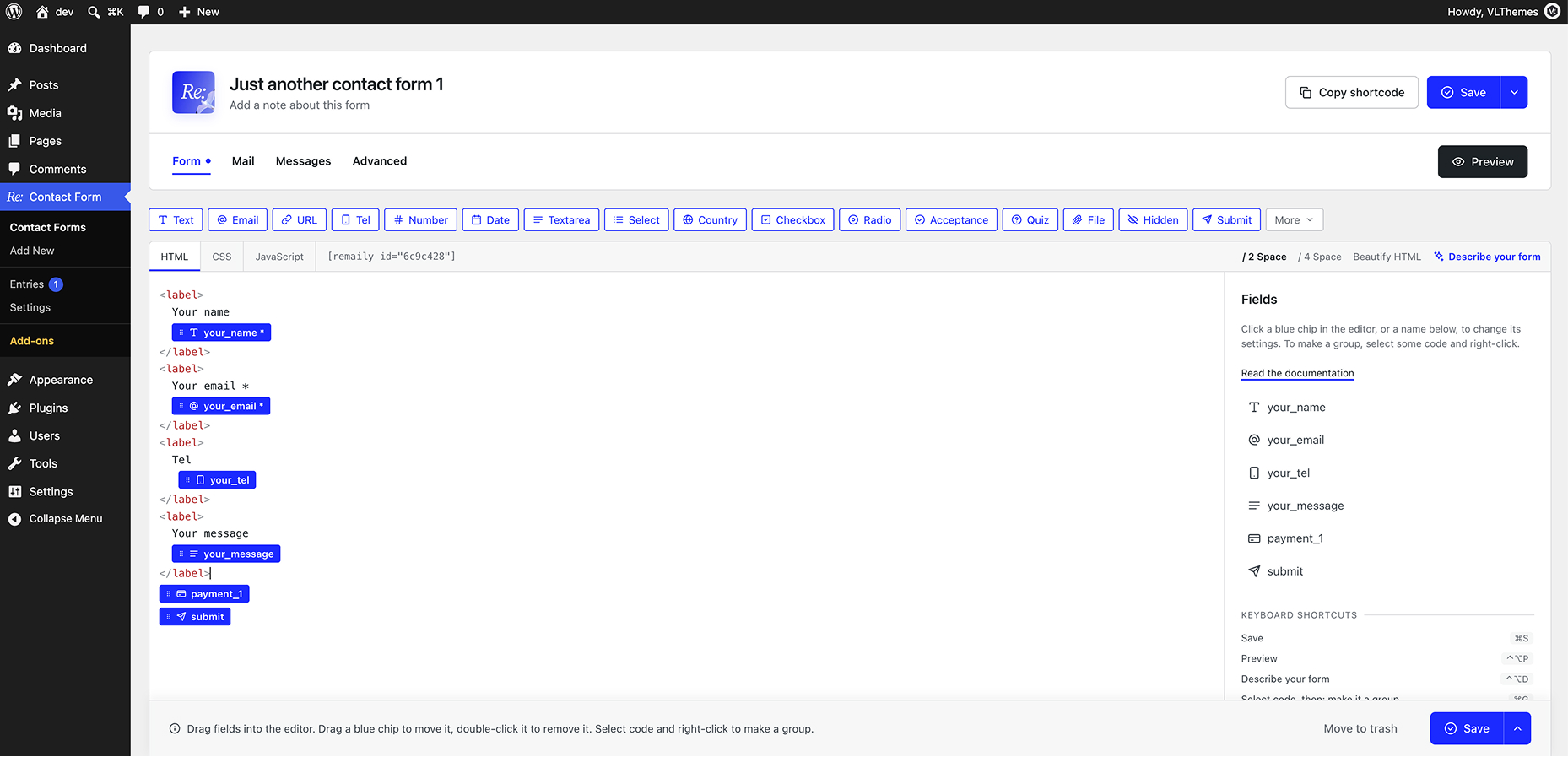
A form in Re:Maily is plain HTML with a chip for each field. Drag fields in, click one to set it up, and the preview shows the form in your own theme’s styles as you type.
- 19 field types: text, email, phone with masks, select, checkboxes, country, file upload, a quiz against bots, and an Output field that mirrors what someone types (“Thanks, Olga!”).
- Conditions: wrap any part of the form in a group and show it only when it matters. Groups can repeat, so guests or products are added row by row.
- Entries: every message is saved, even when the mail fails. Filter, mark unread, export to CSV.
- Payments: Stripe and PayPal inside the form, with the amount checked again on your server. Re:Maily takes no fee.
- Spam: a honeypot, a time check and a rate limit on every form, plus Turnstile, hCaptcha, reCAPTCHA or Akismet when you want them.
- Light: one 5 KB script (gzipped), only on pages with a form. No jQuery.
- Moving from Contact Form 7: import your forms with their mails and messages. Old shortcodes keep working.
It works with the block editor, Elementor, WPBakery or a shortcode, and a theme can override every template.
Support for buyers only
If you sell themes, plugins or courses, add a Purchase code field to your support form. When someone sends it, Re:Maily asks the store whether the code is real before the message is sent.
- A wrong code never reaches you. The visitor sees why, right in the form.
- A real code goes through, and your email shows the product, the buyer and when their support ends. You don’t have to look anything up.
- Expired support can be turned away too, or let through with a note. You decide.
There’s one add-on for each store: ThemeForest / CodeCanyon, Gumroad, Lemon Squeezy, Paddle and Freemius. They share one field, so a buyer from any of your stores pastes their code in the same place, and each code goes to the store it could be from. Your API keys stay on your server.
The free Site info add-on adds the site’s WordPress and PHP versions, theme and active plugins to each message. Put a support form inside your theme’s or plugin’s dashboard, and every ticket arrives with the customer’s setup, so you don’t have to ask “which version are you on?”
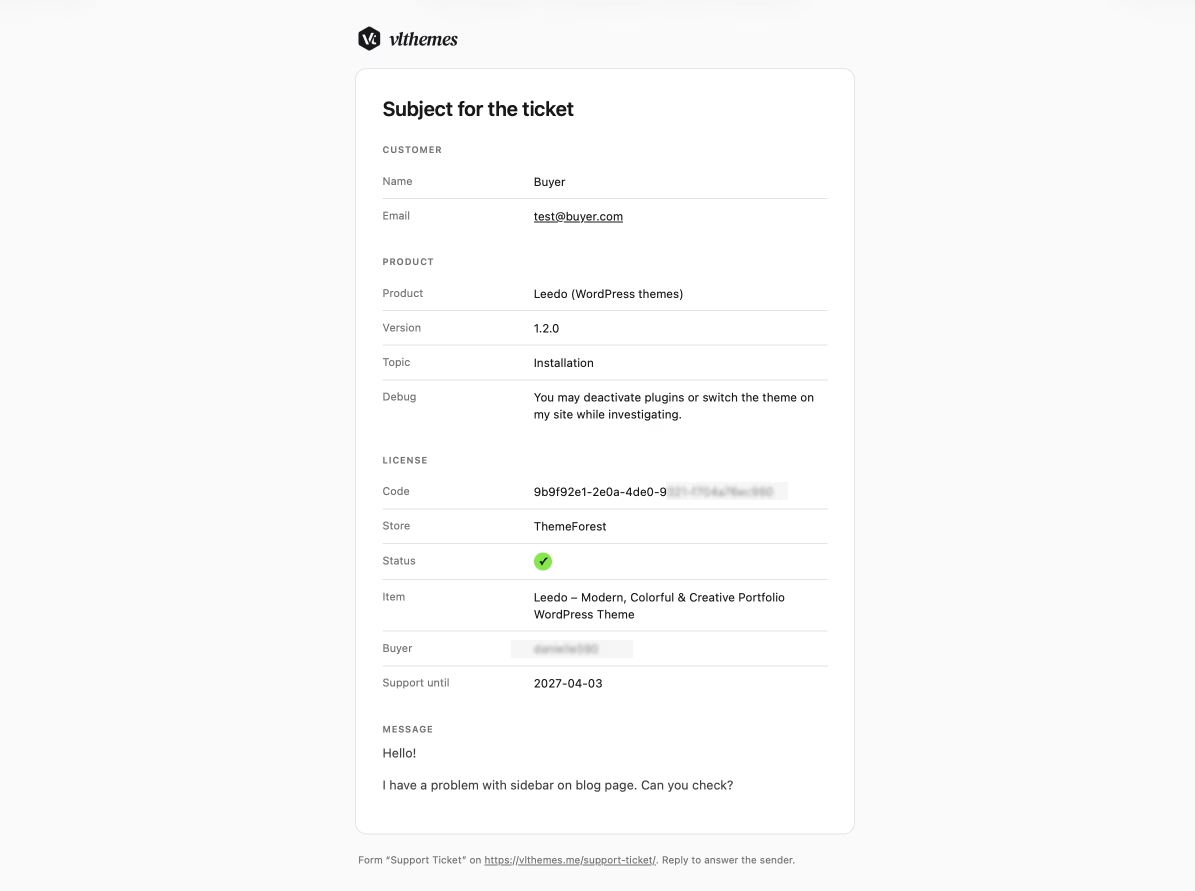
For us this cut the back-and-forth on most tickets to one reply. The time we save goes to the people who paid.
You can see it at work on our own support form, which is built on Re:Maily.
And you’ll never miss a support request again: connect the Telegram or WhatsApp add-on, and every new ticket lands on your phone the moment it’s sent.
Want the same? Join us. Move your themes to Re:Maily and leave the dinosaurs behind: the old form plugins that take markup, shortcodes and extra add-ons just to get a working form. Contact Form 7, for one, no longer supports the older PHP versions that still run about 40% of the market.
Add-ons for the jobs only some sites have
The core plugin covers what most forms need. Add-ons are small separate plugins, so you only load what you use. There are 21 premium and 1 free at launch:
- Calculator: totals from formulas, option prices and dates, shown as visitors fill the form, and charged by the Payment field.
- Bookings & Time Slots: only free times show, each booking lands in your Google Calendar, nothing is booked twice.
- Google Sheets: each message becomes a row, a column per field.
- Telegram and WhatsApp: requests go to your phone the moment they’re sent.
- Help Scout: each message becomes a conversation in your help desk, with the customer, their files and a note for your team.
- Coupons: a promo code field with a discount, an end date and a limit of uses.
- Brevo: grow your mailing list with double opt-in.
- Razorpay: cards, UPI, netbanking and wallets for India.
- Suggested answers: articles from your docs that may answer the question show while it’s typed, so fewer questions reach you.
- ThemeForest, Gumroad, Lemon Squeezy, Paddle, Freemius: support for buyers only (above).
- Star rating: free. Stars visitors click, with your own icon if you like.
Each licence is for one site, for a year or for life. All of them are listed in Contact Form → Add-ons.
Launch offer: 50% off every add-on
For the first 50 buyers, until 31 Dec, every premium add-on is half price with the code LAUNCH50 at checkout on Gumroad.
Get started
- Try it without installing: open the demo in WordPress Playground, a site in your browser with three ready forms.
- Install it: Plugins → Add New Plugin, search for “Re:Maily”, or get it from wordpress.org/plugins/remaily.
- Read the docs: your first form takes about five minutes, and From Contact Form 7 covers the move.
Tell us what you think
This is version 1.0, and what comes next depends on you. If something breaks or a field is missing, write on the support forum. If Re:Maily saves you time, a review on wordpress.org helps other people find it.
Also you can check our support form, which builded on Re:Maily.